Attackers are blending automation with old-school deception. |
Today’s stories cover AI security, ransomware tactics, automated recon, a critical VPN flaw, and AI coding risks.
Tell us what content you want to see on TechRepublic by taking this quick survey. Read past newsletters here. |
|
|
|
Here’s what you need to know: |
|
|
|
ChatGPT Lockdown Mode Reaches More Business Users |
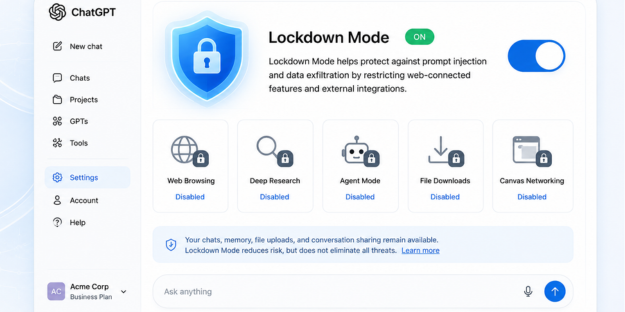
OpenAI has expanded ChatGPT’s Lockdown Mode to eligible personal users and self-serve business accounts, bringing stricter AI security controls to a wider audience.
The optional setting reduces prompt injection and data leakage risks by restricting web-connected features, including browsing, Deep Research, agent mode, and file downloads. |
OpenAI notes that Lockdown Mode mitigates but does not eliminate risks from malicious instructions hidden in files or web content. Define when employees should use Lockdown Mode, especially for confidential or regulated data. |
Silent Ransom Group Escalates With Vishing and Office Intrusions |
A financially motivated threat group linked to Silent Ransom is targeting U.S. law, financial, and professional services firms with a blend of vishing, IT impersonation, and even in-person office visits.
Google Mandiant found that attackers use benign invoice emails and fake IT support calls to convince victims to install remote access tools, enabling rapid data theft and extortion. The group has also gone a step further by physically entering offices under false pretenses to access devices and steal sensitive information.
Train employees to verify all unsolicited IT support requests and restrict the use of remote access and screen-sharing tools. |
Automated Recon Tool Simplifies Cyberattacks |
A Telegram bot can now turn a single email address into a detailed victim profile by automatically aggregating data from breached databases and other sources.
Flare researchers say the tool makes phishing, fraud, impersonation, and account takeover attacks easier by eliminating the need for attackers to manually collect and connect information.
The automation also lowers the barrier to entry, enabling less-skilled threat actors to conduct reconnaissance that previously required significant time and expertise. Users should focus on limiting publicly exposed information and strengthen identity security controls. |
|
|
|
Which exposed data point poses the greatest risk? |
|
|
|
Yesterday's Pulse Check Results |
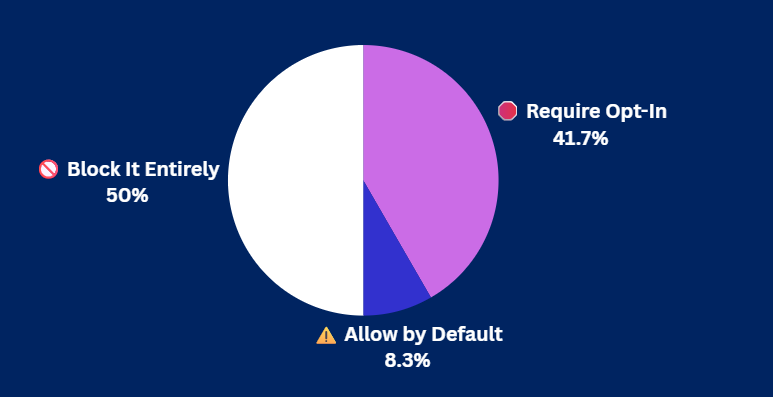
Should Smart TVs Require Opt-In for Data Routing? |
|
|
|
Security Tools You Can Use |
|
|
|
CISA Warns of Actively Exploited Check Point VPN Flaw |
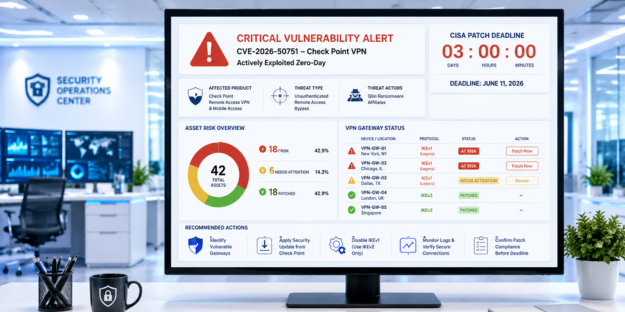
U.S. federal agencies have been given just three days to secure Check Point VPN systems against a critical vulnerability that is already being exploited in zero-day attacks.
The flaw, tracked as CVE-2026-50751, allows unauthenticated attackers to bypass authentication and gain remote VPN access under specific configurations using the deprecated IKEv1 protocol. |
Check Point linked at least one compromise to a Qilin ransomware affiliate, while CISA added the bug to its KEV catalog. Identify any VPN gateways still using IKEv1 and apply Check Point’s security updates immediately. |
AI Coding Models Demand Different Security Approaches |
Organizations using AI coding assistants are being urged to account for each model’s unique coding personality, which can affect code quality and security.
A recent Sonar analysis found that leading AI models share weaknesses such as security blind spots, technical debt, and the potential to introduce high-severity vulnerabilities, but no model excels at every task.
Experts recommend treating AI-generated code like human-written code by applying the same testing, security reviews, and risk assessments. Match AI models to the tasks they perform best and train developers to spot their security weaknesses during code reviews. |
|
|
|
AI is moving faster than security teams can keep up—59% say AI risks outpace their expertise. See how organisations are navigating this gap, and what early adopters are doing to stay ahead. |
|
|
|
Protect Your Identity During Job Searches |
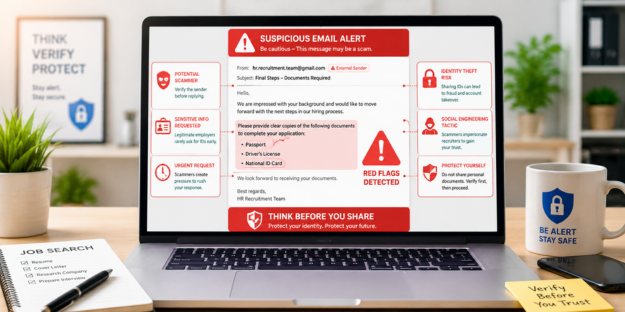
Job scams are becoming more sophisticated, with some fake recruiters and fraudulent job postings requesting government IDs, banking details, or other sensitive information early in the hiring process. |
How to stay safe while job hunting: |
-
Verify recruiters and employers by confirming the recruiter is affiliated with the company through official websites, LinkedIn profiles, or company contact information.
-
Limit personal information on applications by providing only your resume and professional contact details during the initial stages of the hiring process.
-
Be cautious of ID requests since legitimate employers rarely require passports, driver's licenses, or other government-issued identification before interviews or formal onboarding.
|
Taking a few minutes to verify recruiters and limit what you share can help prevent identity theft and keep your job search focused on legitimate opportunities. |
|
|
|
| Senior Staff Writer at TechnologyAdvice |
Luis Millares is a seasoned tech writer with broad experience reviewing consumer gadgets and enterprise software, offering clear, reliable insights across the latest in technology. |
|
|
|
Cybersecurity Insider is a TechnologyAdvice business |
© 2026 TechnologyAdvice, LLC. All rights reserved. |
TechnologyAdvice, 3343 Perimeter Hill Dr., Suite 215, Nashville, TN 37211, USA. |
|
|
|
|