The signals look routine… until they’re not. |
Password resets, browser updates, AI assistants, and underground forums all play a role in this week’s security story, where trusted systems blur into attack surfaces and small missteps can create outsized risk. Read past newsletters here. |
|
|
Here’s what you need to know: |
|
|
Instagram Password Reset Emails Trigger Phishing Fears |
Unexpected Instagram password reset emails sparked breach fears, but the company says its systems were not compromised. Instagram said no systems were breached, attributing the incident to abuse of its account recovery feature. |
Source: Alexander Shatov/Unsplash |
While the attackers could not access the user email accounts, repeated reset prompts can condition users to trust future messages and lower skepticism for phishing attacks.
Implement phishing-resistant MFA, tighten password reset abuse controls, and reinforce user guidance to access accounts only through trusted apps or bookmarked URLs. |
Texas Fuel Operator Suffers Breach |
A phishing attack against a Texas-based gas station operator exposed sensitive customer data and disrupted internal systems.
Gulshan Management Services said attackers used stolen credentials to access external systems, deploy malware, and expose personal data of more than 377,000 individuals. The company has begun sending breach notification letters to impacted customers.
Improve detection and containment by tightening access controls, monitoring third-party systems closely, and maintaining tested incident response and customer communication plans.
|
BreachForums Data Leak Exposes Nearly 324K Records |
A data breach at BreachForums exposed nearly 324,000 users, turning the Dark Web marketplace into a liability for its own members. The leak exposed usernames, hashed passwords, emails, IP addresses, and PGP keys, undermining threat actor anonymity.
This exposure could accelerate investigations and drive spikes in retaliatory or follow-on attacks as threat actors scramble to regroup. Monitor leaked cybercrime data and correlate it with internal telemetry to improve attribution, anticipate follow-on attacks, and strengthen response readiness. |
|
|
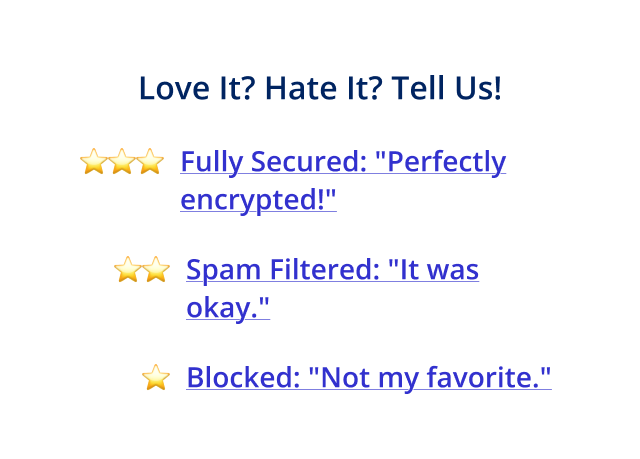
When attackers target each other, what’s your move? |
|
|
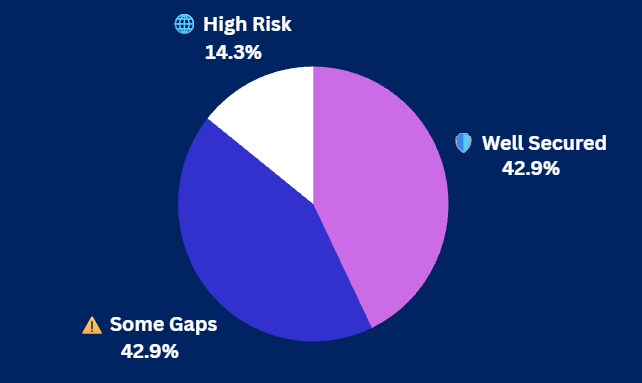
Yesterday's Pulse Check Results |
How exposed is your AI infrastructure right now? |
|
|
Security Tools You Can Use |
|
|
Google Patches Chrome Flaw Potentially Impacting Billions of Users |
Google released a Chrome update fixing a high-severity flaw and curbing abusive push notifications potentially affecting billions of users. The update fixes CVE-2026-0628, a Chrome WebView flaw that could enable code injection in apps and in-app browsers on unpatched desktop and Android systems. |
Google recommends updating to the latest version of Chrome.
Immediately apply the latest Chrome updates across all endpoints and review extension, WebView, and notification permissions to reduce exploitation risk. |
ZombieAgent Attack Targets ChatGPT Connectors |
Radware researchers demonstrated an attack that abuses ChatGPT connectors to quietly exfiltrate data from email, file, and collaboration platforms. The ZombieAgent attack shows how hidden instructions in emails or files can manipulate AI memory to leak data across connected services like Gmail and GitHub.
OpenAI has released a patch for the issue. Limit AI connector access to essential systems only and routinely audit AI memory and permissions to reduce exposure from indirect prompt injection attacks. |
|
|
Don’t worry, this isn't your HR department. When we say "sensitive," we mean something that keeps CISOs up at night: risks to their organizations' data.
Fortra DSPM helps you discover, classify, and protect your sensitive data across your cloud and SaaS apps before a security incident becomes tomorrow’s headline.
Read more about how our solution's capabilities go beyond those of other DSPM vendors and enjoy a 30-day risk assessment to learn how we can improve your security posture. |
|
|
Is Your AI Usage Putting Sensitive Data at Risk? |
AI assistants are increasingly connected to email, documents, and collaboration tools, making them powerful — and risky — gateways to sensitive information. Attackers can exploit prompts, connectors, and memory features to extract data silently, turning convenience into an unexpected security exposure. |
How to protect data when using AI: |
- Limit AI access and permissions by connecting only essential systems, enforcing least privilege, and monitoring for abnormal AI-driven activity.
-
Reduce data exposure by avoiding sensitive information in prompts and regularly reviewing or clearing AI memory and interaction history.
-
Train users to recognize prompt injection and other AI-specific abuse techniques, especially those embedded in emails or shared files.
|
As AI becomes embedded in daily workflows, organizations must limit access, reduce data retention, and monitor behavior to prevent silent data leakage or abuse. |
|
|
|
Ken Underhill is an award-winning cybersecurity professional, bestselling author, and seasoned IT professional. He holds a graduate degree in cybersecurity and information assurance from Western Governors University, bringing years of hands-on experience to the field. |
|
|
Cybersecurity Insider is a TechnologyAdvice business |
© 2026 TechnologyAdvice, LLC. All rights reserved. |
TechnologyAdvice, 3343 Perimeter Hill Dr., Suite 215, Nashville, TN 37211, USA. |
|
|
|