The cyber frontlines are buzzing, Digital Defenders. |
This week’s intel uncovers leaked Gmail credentials flooding the web, an AI browser flaw opening new attack paths, ransomware hitting critical infrastructure, and an AI misfire involving chips. From data dumps to digital warfare… this one’s worth reading twice. |
|
|
Here’s what you need to know: |
|
|
Gmail Users Caught in 183M-Account Data Leak |
A massive trove of 183 million stolen credentials, including 16.4 million Gmail addresses, has surfaced online. Researchers traced the 3.5-terabyte dataset to infostealer malware that harvested logins from infected devices. Google has confirmed its systems were not breached. |
Check sites like Have I Been Pwned for your data, change any reused passwords, and enforce multifactor authentication (MFA) across all accounts. |
ChatGPT Atlas Browser Flaw Exposes Users to Attack |
LayerX researchers discovered a vulnerability in OpenAI’s Atlas browser that lets attackers inject malicious code into its memory, enabling remote execution and full system compromise.
Researchers warn that the CSRF-based exploit can persist across sessions and devices. Atlas blocked only 5.8% of phishing attempts — making users 90% more vulnerable than Chrome or Edge — and its always-signed-in design means one malicious link could expose both personal and enterprise data.
OpenAI has not responded yet to the LayerX findings. Use enterprise-managed browsers with sandboxing, disable persistent sessions, and enforce strict reauthentication policies for AI tools to protect against memory-hijacking attacks. |
When AI Meets Doritos: Crunch Time Turns into a Code Red |
An AI weapon detector at a Baltimore school falsely flagged a Doritos bag as a gun, leading police to handcuff a 16-year-old student.
Developed by Omnilert, the system misidentified the object as a firearm, triggering procedural errors and a full police response. While this incident stemmed from human error, it raises questions about the ethical and operational risks of AI.
Before deploying AI detection or monitoring systems, conduct independent accuracy audits, enforce human-in-the-loop verification, and establish strict escalation protocols to prevent false positives from becoming crises. |
|
|
AI Oversight Reality Check: Who’s really watching your robots? |
|
|
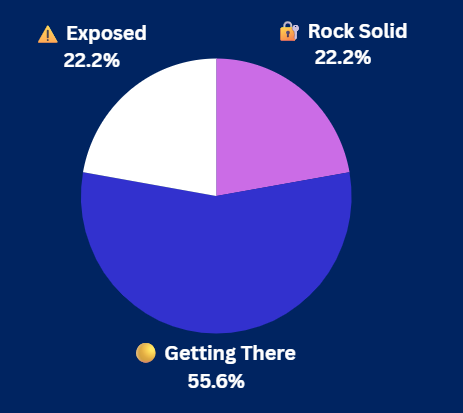
Yesterday's Pulse Check Results |
How confident are you in your org’s DNS defenses? |
|
|
Security Tools You Can Use |
|
|
Everest Hackers Target Sweden’s Energy Operator |
Sweden’s state-owned grid operator, Svenska kraftnät, confirmed a cyberattack on an external file transfer system that exposed data but didn’t affect power operations.
The Everest ransomware group claimed the attack, leaking 280 GB of stolen data online. |
Though Sweden’s power grid operations weren’t disrupted, the breach highlights how ransomware gangs increasingly target critical infrastructure. The investigation into the attack is ongoing.
Security teams should segment IT and OT environments, implement zero-trust, and conduct penetration tests. |
Iran Hit as Predatory Sparrow Escalates Attacks |
Threat actor group Predatory Sparrow has escalated its cyber campaigns against Iran, hitting gas stations and banks in a wave of destructive, politically timed attacks.
Picus Security analyzed the group’s TTPs, revealing a blend of precision engineering and psychological warfare, including custom wipers such as Meteor, used to erase data and cripple recovery systems.
These operations underscore a new era of state-aligned cyber warfare where digital attacks yield kinetic-level impact without direct combat.
Critical infrastructure teams should adopt zero-trust, enforce network segmentation between IT and OT, and routinely test incident response plans through tabletops. |
|
|
Microsoft’s guide to Active Directory forest recovery is 40 pages of planning and process + 22 appendices = 149-page disaster recovery plan. Not something you can figure out in the middle of a cyberattack. Read our Guide to The Guide, and maybe chat with a recovery pro? |
|
|
Stop Identity Theft Before It Starts |
Data breaches are soaring, exposing millions of credentials each month. Even if you’re not directly targeted, stolen data fuels identity theft, phishing, and account takeovers — making proactive identity protection essential to avoid lasting financial and reputational harm. |
Source: Towfiqu barbhuiya/Unsplash |
How to protect your identity after a data breach: |
-
Audit and strengthen your credentials: Check for exposure on sites like Have I Been Pwned, update compromised account credentials, and use a password manager to generate unique passwords for each login.
- Lock down access: Enable multifactor authentication (MFA) to secure accounts even if passwords leak.
- Monitor and stay vigilant: Freeze or monitor credit for fraud and scrutinize unexpected login or reset alerts to avoid phishing traps.
|
Staying secure after a breach isn’t a one-time fix — it’s an ongoing habit. Stay alert, update often, and treat your digital identity with the same care you give your most valuable business assets. |
|
|
| Ken Underhill is an award-winning cybersecurity professional, bestselling author, and seasoned IT professional. He holds a graduate degree in cybersecurity and information assurance from Western Governors University, bringing years of hands-on experience to the field.
|
|
|
Cybersecurity Insider is a TechnologyAdvice business |
© 2025 TechnologyAdvice, LLC. All rights reserved. |
TechnologyAdvice, 3343 Perimeter Hill Dr., Suite 215, Nashville, TN 37211, USA. |
|
|
|