Don’t get comfortable, Digital Defenders. |
Today’s updates reveal a troubling pattern: attackers are hijacking the tools we trust most. Chrome, dev environments, even employee credentials—all are being exploited to breach defenses and quietly infiltrate networks. |
|
|
Here’s what you need to know: |
| |
Chrome Users at Risk: Google Rushes Out Emergency Patch for Active Zero-Day |
Discovered by Google’s Threat Analysis Group, which monitors state-sponsored hacking campaigns, the bug was mitigated on June 26 via a configuration change across all platforms. Updates are now rolling out to Windows, Mac, and Linux users in the Stable channel. Remember to update Chrome or relaunch the browser to apply the fix and reduce exposure to targeted spyware attacks. |
US on Alert: Iranian Hackers May Target Critical Infrastructure |
US cyber agencies—including CISA, the FBI, and the NSA—have issued an urgent advisory warning of potential cyberattacks from Iranian-affiliated hackers targeting critical infrastructure sectors.
The advisory highlights common tactics, such as exploiting unpatched systems and default credentials. It also warns of politically motivated DDoS and defacement campaigns, which are often promoted via social media. Make sure to bolster your defenses and monitor for suspicious activity, particularly as tensions in the Middle East rise. |
Flawed Extension Verification in Popular IDEs Exposes Developers to Code Execution Attacks |
New research by OX Security reveals that several major IDEs—including Visual Studio Code, Visual Studio, IntelliJ IDEA, and Cursor—contain flaws in their extension verification processes, allowing malicious plugins to appear as trusted.
The findings highlight a critical supply chain risk, particularly given the sensitive data handled in development environments. Despite Microsoft stating that safeguards are in place, researchers found that the flaw was still exploitable as of late June 2025. If you’re a developer, avoid sideloading extensions and carefully verify plugin sources. |
|
|
When was the last time you updated your browser? |
|
|
Yesterday's Pulse Check Results |
Would you allow Facebook to access your full camera roll for AI edits? |
|
|
- Keeper is an easy-to-use, zero-knowledge password manager that protects your passwords and other critical login credentials across all devices.
-
OysterVPN is a lifetime VPN that gives you unlimited global streaming, offers data encryption, and protects up to 10 devices with fast servers.
|
|
|
Cyberattack Cripples Esse Health Systems, Exposes 263K Patient Records |
Esse Health, the largest independent physicians' group in the St. Louis area, is alerting 263,601 patients that their private data was stolen during a cyberattack on April 21, 2025. |
The breach took down patient-facing systems and phones, which weren’t fully restored until June 2. The organization confirmed that attackers accessed and copied sensitive files, prompting a detailed investigation to identify affected individuals and the types of data compromised. Patients are advised to monitor their medical records, credit reports, and insurance statements for any suspicious activity. |
US Busts North Korean ‘Laptop Farm’ Scheme Operating Across 16 States |
The US Department of Justice has dismantled a large-scale operation in which North Korean IT workers, using fake or stolen identities and AI-generated credentials, infiltrated over 100 US companies to funnel salaries back to the DPRK regime.
As part of the year-long “DPRK RevGen” initiative, officials raided 29 laptop farms in 16 states. Authorities estimate the scheme generated over $5 million in illicit revenue and exposed sensitive data, including export-controlled military technology. Strengthen background checks, verify device usage locations, and monitor for signs of identity fraud in your remote hiring processes. |
|
|
Don’t Fall Victim to ClickFix Attacks |
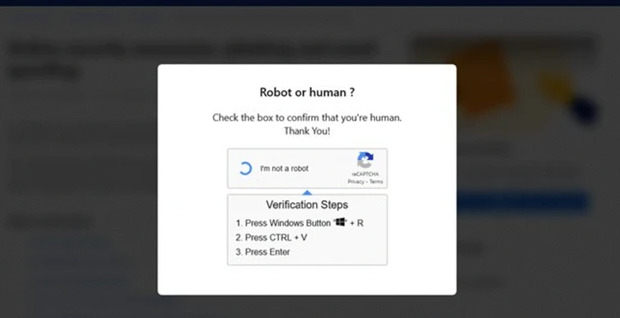
ClickFix attacks are exploding in popularity and have become one of the top threats targeting desktop users. Disguised as urgent fixes, CAPTCHA challenges, or update alerts, these sneaky scams trick victims into unleashing dangerous malware. |
Attackers use fake websites or compromised legitimate ones to convince users to launch malware, such as infostealers, remote access trojans, and ransomware. Despite their simplicity, these scams remain highly effective. A similar tactic is used for targeting Mac, iOS, Android, and other platforms. |
Tips to avoid ClickFix attacks: |
-
Don’t run unknown commands, especially via Windows + R in Windows
- Ignore pop-ups asking you to “fix” something or verify your identity.
- Avoid links in suspicious emails or fake update prompts.
- Reboot and run a security scan if you think you clicked.
-
Change your passwords, especially for key accounts.
|
Stay vigilant. Knowing how to handle unexpected prompts is your strongest defense against these deceptive ClickFix attacks. |
|
|
| Leon Yen is a cybersecurity expert and seasoned tech journalist with over a decade of experience, including founding a cyber risk startup and leading industry-focused research and reporting. |
|
|
Into more than just malware and mayhem? |
Stay sharp on AI, cloud, DevOps, and the tech players shaking things up. Subscribe to Daily Tech Insider for no-fluff rundowns and witty breakdowns delivered straight to your inbox—because knowing what’s next helps you stay secure. |
|
|
Into more than just malware and mayhem? |
Stay sharp on AI, cloud, DevOps, and the tech players shaking things up. Subscribe to Daily Tech Insider for no-fluff rundowns and witty breakdowns delivered straight to your inbox—because knowing what’s next helps you stay secure. |
|
|
Cybersecurity Insider is a TechnologyAdvice business |
© 2025 TechnologyAdvice, LLC. All rights reserved. |
TechnologyAdvice, 3343 Perimeter Hill Dr., Suite 100, Nashville, TN 37211, USA. |
|
|
|