Brace yourselves, Digital Defenders! 🛡️ |
It’s been a rough week for defaults. From emoji-triggered jailbreaks to exposed Helm charts and LLM workflow tools getting popped in the wild, security assumptions are falling fast. If it looked safe last week, it might not be now. |
|
|
Here’s what you need to know: |
-
Emoji prompts bypass content filters across Azure, Meta, and NVIDIA models
- Fake CAPTCHA trick installs AMOS stealer on thousands of macOS devices
- RDGA-powered Facebook scams scale up with deepfakes and fake crypto sites
- Langflow flaw under active attack, full server RCE via public endpoint
|
|
|
Emoji Bypass Cripples Microsoft, Meta, and NVIDIA AI Filters |
In a reality check for AI safety teams, researchers have discovered that a single emoji (yes, 😃 or ❤️) can trick major content filters into letting harmful outputs slip through.
AI models from Microsoft (Azure), NVIDIA, and Meta (LLaMA) were all shown to misinterpret prompts containing emojis and generate content that should’ve been blocked. The trick exploits how NLP systems parse symbolic language, causing them to miss context or misclassify input. |
If you deploy generative models, don’t assume guardrails are enough. Stress-test your filters with symbols, emojis, and creative edge cases, and disable auto-responses on risky prompts. |
Over 2,800 Hacked Sites Target macOS Users with AMOS Malware |
A new campaign, called MacReaper, is targeting Apple users through over 2,800 compromised websites. The trick? Fake Google CAPTCHA prompts that urge users to open Terminal and paste a “verification” command that installs the AMOS stealer malware.
This malware can swipe Keychain passwords, browser logins, crypto wallets, and files from the Desktop and Documents folders. Even more dangerous: the attack infrastructure hides malicious instructions inside blockchain transactions using EtherHiding. Remember: Don’t trust CAPTCHAs that ask for Terminal input. And if you’re managing a macOS fleet, start monitoring clipboard activity and Terminal executions. |
Android Zero-Day in FreeType Actively Exploited |
Google’s May 2025 Android Security Bulletin includes a patch for CVE-2025-27363, a zero-day vulnerability in the FreeType library used to render fonts. Flagged by Facebook earlier this year, the flaw lets attackers run code remotely by tricking Android into displaying a malicious font, possibly just by opening an app or document.
The bug affects Android 13, 14, and 15, and has already been used in attacks. Check your patch level. Anything dated 2025-05-05 or later is safe. Additionally, avoid opening unknown files and enable Play Protect. |
|
|
Investment Scam Rings Scale Up on Facebook with Celebrity Deepfakes |
They’re using RDGA (Registered Domain Generation Algorithm) techniques to spawn thousands of near-invisible phishing domains and filter users via IP validation to avoid detection. The scam pages look legitimate, run on convincing infrastructure, and even include call centers that walk victims through setting up “accounts.” Watch for off-brand domains and beware of investment ads, even when they look polished. |
Langflow Flaw Exploited for Full Server Takeover |
A critical Langflow vulnerability (CVE-2025-3248) is under active exploitation. The open-source tool, popular among AI developers for building LLM workflows, left an API endpoint wide open. Horizon3 researchers released a proof of concept showing how easily attackers can run malicious code through it.
Over 500 Langflow instances are currently exposed on the public internet. CISA issued an emergency directive requiring U.S. agencies to patch or isolate systems by May 26. Version 1.3.0 fixes the issue, and Langflow 1.4.0 adds additional hardening. If you’re running Langflow, update immediately. |
Helm Chart Misconfigs Expose Kubernetes Clusters |
Microsoft's security team just dropped a warning: many popular Helm charts (the go-to tool for deploying apps in Kubernetes) come dangerously insecure out of the box.
Charts for Apache Pinot, Meshery, and Selenium Grid expose services to the public internet without enabling authentication. In one case, attackers could register as new users and start spinning up pods in someone else’s cluster. DevOps teams: stop treating “default” as “secure.” Review every Helm chart, enforce auth across all services, and scan your clusters for exposed endpoints. Fast deploys shouldn’t cost you your infrastructure.
|
|
|
🛡️ This section contains sponsored cybersecurity insights. |
|
|
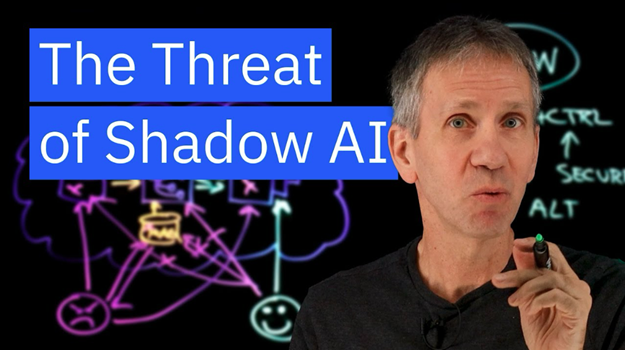
Don’t Let Shadow AI Slip Through the Cracks |
When employees use unapproved AI tools—what experts call Shadow AI—they may quickly solve problems. But they’re also exposing your company to hidden security risks.
A recent study shows 75% of knowledge workers use AI, and nearly half would keep using it even if their company banned it. |
Source: IBM Technology (YouTube) |
Some are cheap replicas that’ll crash on you faster than a bad first date, while others are packing malicious software or hardware designed to hack your life into oblivion. What’s a Black Friday bargain hunter to do? |
To defend against shadow AI, apply the four-step OODA system: |
- Observe: Use network monitoring and behavioral analytics to detect rogue tools. Watch for unusual data uploads or unknown AI endpoints.
- Orient: Assess the risk of each unsanctioned tool. Some may be harmless, while others could be data breaches waiting to happen.
- Decide: Set clear, flexible AI usage policies based on role, data type, and risk level. Give employees secure, approved alternatives to avoid shadow workarounds.
- Act: Enforce policies with technical controls, like zero-trust access, and routinely update governance as AI tools evolve.
|
The goal isn’t to block AI, it’s to channel it safely. Shadow AI isn’t going away, but with the proper visibility, it can drive innovation without sacrificing control. |
|
|
|
| Secure Links: The Must-Reads |
|
|
| Secure Links: The Must-Reads |
| |
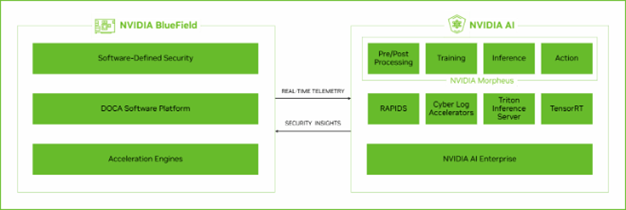
NVIDIA’s DOCA Argus Streamlines Off-Host Security |
NVIDIA is gunning for a piece of the trillion-dollar cybersecurity market, and its weapon of choice is DOCA Argus. This new security platform runs entirely off-host using BlueField data processing units and detects threats up to 1,000x faster than traditional agentless tools by directly analyzing memory.
That means no performance drag, endpoint slowdowns, or attack surface inside the monitored system. |
If you’re scaling AI infrastructure, consider off-host defense as part of your stack. It’s fast, stealthy, and designed for noisy, multi-node environments. |
Microsoft Adds SafeLinks Protection to Copilot and Office Apps |
Microsoft 365 Copilot just got a major security upgrade: time-of-click protection for all hyperlinks. The rollout brings Defender’s SafeLinks feature into every Copilot response across desktop, web, mobile, Outlook, and Teams.
Links are scanned in real time, and anything sketchy gets blocked before the browser opens. Even users without full Defender coverage now get baseline URL checking inside the Copilot chat interface. Ensure SafeLinks is turned on in your organization’s policies, and educate users to pause before clicking. Just because it came from AI doesn’t mean it’s safe. | |
|
| Leon Yen is a cybersecurity expert and seasoned tech journalist with over a decade of experience, including founding a cyber risk startup and leading industry-focused research and reporting. |
|
|
|
Liz Ticong is a tech writer specializing in AI and software tools, known for turning complex topics into clear, actionable insights through hands-on testing and analysis. |
|
|
We're looking for talented writers to help shape Cybersecurity Insider. If you're passionate about cyber security, apply to join our team! |
|
|
Cybersecurity Insider is a TechnologyAdvice business |
© 2025 TechnologyAdvice, LLC. All rights reserved. |
TechnologyAdvice, 3343 Perimeter Hill Dr., Suite 100, Nashville, TN 37211, USA. |
|
|
|